
Home CPAP Therapy CPAP Troubleshooting
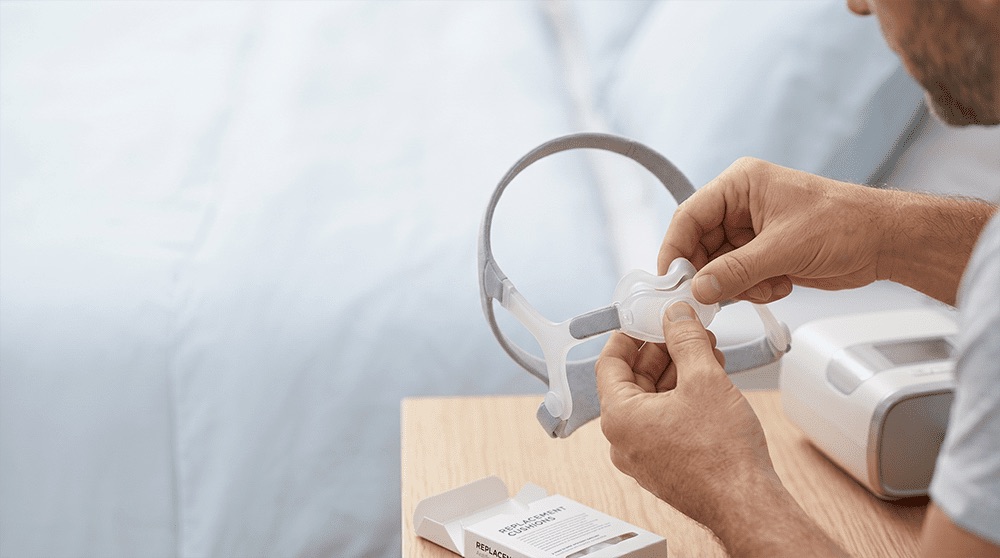
CPAP Equipment Support
CPAP Troubleshooting
Find safe first checks for common CPAP concerns—including mask leaks, dryness, condensation, noise, skin irritation, and comfort—and learn when to contact MedPro or your clinician.
Quick Answer
What Should You Check First?
Start with the equipment connections, mask fit, water chamber, filter, and the instructions for your exact device. Many comfort or equipment concerns have a simple cause, but persistent problems deserve support.
Check Every Connection
Confirm the tubing, mask elbow, humidifier chamber, power cord, and removable components are fully seated.
Refit the Mask Gently
Position the mask as directed, turn on airflow, and adjust only enough to create a comfortable seal. Tighter is not always better.
Inspect the Air Path
Look for kinked tubing, blocked vents, a dirty or incorrectly installed filter, or an obstructed device air inlet.
Use the Correct Instructions
Check the user guides for your exact machine, mask, tubing, and humidifier before disassembling parts or changing comfort settings.
Important: Do not change prescribed pressure settings or disable safety features unless your authorized care provider directs you to do so.
Troubleshoot by Concern
Common CPAP Problems and Safe First Steps
Use these general checks with the instructions for your equipment. Stop and contact MedPro when a concern continues, a part appears damaged, or you are unsure what a device message means.
Mask Leaks or Air Near the Eyes
- Confirm the cushion is seated evenly and not folded
- Refit the mask while lying in your normal sleeping position
- Clean facial oils from the cushion as directed
- Check the elbow, short tube, and main tubing connections
Do not keep tightening the straps. Persistent leaks may require another cushion size, mask style, or replacement part.
Dry Mouth, Nose, or Throat
- Check for a mask leak or air escaping through the mouth
- Confirm the humidifier chamber is installed correctly
- Review the approved humidity and heated-tube controls in your user guide
- Ask about another mask style if mouth leak continues
Ask your clinician before using medicated nasal products or making therapy-setting changes.
Water in the Tubing or Mask
- Empty and dry collected water before reconnecting the system
- Check that the chamber is not overfilled
- Keep tubing from resting against cold windows or outside walls
- Review approved heated-tubing and humidity options for your device
Water caused by condensation is often called rainout. Never operate equipment with water spilled into the device.
Skin Irritation or Pressure Marks
- Wash and fully dry the cushion according to its instructions
- Wash and dry your face before applying the mask
- Check for overtightened or uneven straps
- Inspect cushions and headgear for stiffness, tears, or wear
Contact MedPro about persistent marks, pain, or broken skin. Another size, mask style, or replacement part may be appropriate.
Noise, Whistling, or Device Alerts
- Check the tubing, chamber, elbow, and cushion connections
- Make sure mask vents and the device air inlet are not blocked
- Inspect tubing and seals for cracks or damage
- Write down the exact alert or error code and check the device manual
Do not cover vents, open the machine housing, or keep using a device with a damaged cord, burning smell, water intrusion, or repeated fault.
Pressure or Comfort Feels Difficult
- Check for a significant leak that may affect comfort
- Use only prescribed or provider-enabled comfort features
- Practise wearing the mask while awake if anxiety or unfamiliarity is the concern
- Record when the concern occurs and what you notice
Contact your clinician about prescribed pressure, persistent bloating, chest discomfort, breathing concerns, or symptoms that continue despite regular use.
Safe Troubleshooting
CPAP Troubleshooting Dos and Don’ts
Keep troubleshooting limited to routine setup, cleaning, fit, and manufacturer-approved user controls.
Do
- Follow the user guides for every component
- Turn off and unplug equipment before routine cleaning
- Use the water type and cleaning products specified by the manufacturer
- Inspect cushions, tubing, chambers, filters, seals, and cords
- Record alert codes and when a concern occurs
- Ask for support early when a problem continues
Don’t
- Change prescribed pressure settings on your own
- Block or cover the mask’s intentional exhalation vents
- Use damaged electrical parts, tubing, masks, or chambers
- Submerge the CPAP machine or allow water into it
- Use unapproved ozone, UV, solvent, fragrance, or harsh cleaning methods
- Ignore persistent pain, bloating, breathing concerns, or treatment symptoms
Know Who to Call
When to Contact MedPro or Your Clinician
Equipment and fitting concerns belong with MedPro. Prescriptions, health symptoms, and clinical treatment decisions belong with your clinician.
Contact MedPro For
- Mask fit, leaks, headgear, or comfort
- Tubing, filters, chambers, humidification, or replacement parts
- Device setup, routine alerts, or user-guide questions
- Cleaning, maintenance, or replacement timing
Contact Your Clinician For
- Questions about prescribed pressure or treatment settings
- Persistent bloating, chest discomfort, or breathing concerns
- Symptoms that continue or worsen despite using CPAP as directed
- New health, medication, sleep, or treatment concerns
Call Emergency Services For
Chest pain, severe shortness of breath while awake, loss of consciousness, or another medical emergency.
Call 911 or your local emergency service. CPAP troubleshooting is not appropriate for an emergency.
Related CPAP Guidance
Continue with the Right Support Topic
Troubleshooting works best when fitting, routine care, worn components, and follow-up are handled through their dedicated guides.
CPAP Mask Fitting
Review mask styles, seal, sizing, pressure points, and comfort considerations.
Follow-Up Support
Learn what ongoing equipment and comfort support may address after setup.
Cleaning and Maintenance
Follow routine care steps for masks, tubing, chambers, filters, and the device exterior.
Replacement Schedule
See when worn cushions, headgear, tubing, chambers, and filters may need replacement.
Frequently Asked Questions
CPAP Troubleshooting FAQs
General answers for common equipment and comfort questions.
Why is my CPAP mask leaking?
Common causes include an uneven cushion, incorrect size, movement during sleep, facial oil on the seal, worn parts, overtightened headgear, or a loose connection. Refit the mask according to its instructions and contact MedPro if the leak continues.
Should I tighten my CPAP mask to stop a leak?
Only adjust enough to create a secure, comfortable seal. Excessive tightening can fold the cushion, create new leaks, and cause pressure marks. If gentle adjustment does not work, the size, style, or condition of the mask may need review.
How can I reduce water in my CPAP tubing?
Check that the chamber is not overfilled, keep tubing away from cold surfaces, and review the heated-tubing or humidity controls approved for your device. Empty and dry collected water before reconnecting the system. Contact MedPro if condensation continues.
Why does CPAP cause dry mouth?
Possible contributors include mouth leak, mask leak, low humidity, or nasal congestion. Check the fit and humidifier setup, then ask MedPro about equipment options. Consult your clinician before using medication or changing prescribed therapy settings.
What if the CPAP pressure feels too strong or too weak?
Check for a major leak or disconnected component, but do not change prescribed pressure settings yourself. Contact your clinician or authorized care provider to review pressure-related concerns and determine whether clinical reassessment is needed.
What should I do when my CPAP displays an alert?
Write down the complete alert or code, check connections, and follow the troubleshooting section in the exact device manual. Contact MedPro when the meaning is unclear, the alert repeats, or the device appears damaged.
When should I stop using the equipment and call for help?
Stop and contact MedPro for water intrusion, a damaged cord, burning smell, repeated device fault, or visibly damaged parts. Contact your clinician for persistent bloating, chest discomfort, breathing concerns, or worsening symptoms. Call 911 for a medical emergency.
Evidence and Safety
Clinical and Manufacturer Sources
This page draws on public clinical guidance and manufacturer troubleshooting information. The instructions supplied with your exact equipment remain the controlling source for setup, cleaning, and user-adjustable features.
Medical disclaimer: This page provides general equipment education and is not medical advice, a diagnosis, or a substitute for your prescription, device instructions, or advice from a qualified healthcare professional.
CPAP Support
Still Having Trouble with Your CPAP Equipment?
Contact MedPro for help with mask fit, equipment, routine device questions, humidification, cleaning, or replacement parts.